



联系人:何经理
邮箱:2235954483@qq.com
电话:13313705507
地址: 福建漳州市龙海市福建省漳州开发区招商大厦707号
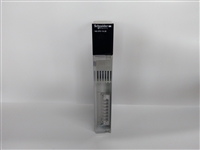
| 品牌 |
施耐德 |
型号 |
140CPU11302R |
| 类型 |
DCS |
加工定制 |
否 |
| 是否进口 |
是 |
|
STEP 7 V5.x的设置:
1.建立一个新的项目;
2.在该项目中添加一个S7-300的站;
3.打开硬件编辑器;
4.添加电源模块和CPU 315-2DP。为了起到测试的目的,将CPU参数中将MB1设置为时钟标志位;
5.将CPU 215-2DP 添加DP段。CPU215-2DP 在硬件编辑器的目录中,即下面的目录中可以找到"PROFIBUS DP \DP VO SLAVE\SIMATIC \ S7-200 CPU 215-2DP"
6.必须在CPU 215-2DP 上添加一个输入/输出模块。在本例中,我们将使用2字节输入,2字节输出的数字交换区,模块信息存放在硬件编辑器的目录中,即下面的目录中:
"...\S7-200 CPU 215-2DP\..."
点击 CPU 215-2DP, 然后将模块拖放到空白处。
7.为从站的输入/输出区域设置地址;
8.双击输入/输出区,进入初始地址的对话框
9.进入CPU 215-2DP储存输入/输出数据的存储区;
10.双击 CPU 215-2DP。打开 "Properties - DP slave" 对话框;
11.在"Parameter Assignment" 表中,CPU 215-2DP V区的一个偏移量。在本例中,偏移量为5000,这就是说,DP输入数据在VB5000或者VB5001中,DP输出区在VB5002或者VB5003中。
12.设置总线参数,在"General" 表中,点击"PROFIBUS" 按钮,在打开的对话框中进入"Network Settings"表。
注意:
在"STEP 7 - Micro / WIN"中,你只能将传输率设置为19.2KB。但是总线系统的速度能而且必须更高(可达12MB)。CPU可自动设置到这个波特率。这种情况无论在"STEP 7 - Micro / WIN"中如何设置都会发生。
13.设置19.2KB为传输率。
14.保存硬件设置。
15.进行测试, 时钟会被传送到输出字节的位(也就是0位)。例如,在OB1中输入如下命令:
L MB 1
T AB 0
16.将硬件设置下载到CPU 315-2DP。
以下是我司【主营产品】,有需要可以发来帮您对比下价格哦!
主营:世界品牌的PLC 、DCS 系统备件 模块
①Allen-Bradley(美国AB)系列产品》
②Schneider(施耐德电气)系列产品》
③General electric(通用电气)系列产品》
④Westinghouse(美国西屋)系列产品》
⑤SIEMENS(西门子系列产品)》
⑥销售ABB Robots. FANUC Robots、YASKAWA Robots、KUKA Robots、Mitsubishi Robots、OTC Robots、Panasonic Robots、MOTOMAN Robots。
⑦estinghouse(西屋): OVATION系统、WDPF系统、MAX1000系统备件。
⑧Invensys Foxboro(福克斯波罗):I/A Series系统,FBM(现场输入/输出模块)顺序控制、梯形逻辑控制、事故追忆处理、数模转换、输入/输出信号处理、数据通信及处理等。Invensys Triconex: 冗余容错控制系统、基于三重模件冗余(TMR)结构的现代化的容错控制器。
⑨Siemens(西门子):Siemens MOORE, Siemens Simatic C1,Siemens数控系统等。
⑩Bosch Rexroth(博世力士乐):Indramat,I/O模块,PLC控制器,驱动模块等。
◆Motorola(摩托):MVME 162、MVME 167、MVME1772、MVME177等系列。
PLC模块,可编程控制器,CPU模块,IO模块,DO模块,AI模块,DI模块,网通信模块,
以太网模块,运动控制模块,模拟量输入模块,模拟量输出模块,数字输入模块,数字输出
模块,冗余模块,电源模块,继电器输出模块,继电器输入模块,处理器模块。
我们的优势是:全新原装,,供给一年质保!本公司所有产品都经过严格检测,欢迎询价,收购。只需您有诚心,本公司将会给你供给一个比同行优势的价格,共同拿下单子。
While many people equate FOSS with the prominent Linux® kernel, or a Linux-based distribution, the use of FOSS beyond Linux in embedded development is pervasive; it is used by almost three-quarters of organizations and spans hundreds of thousands of projects. However, with the increasing popularity of embedded Linux-based systems, the interest in finding Linux drivers for embedded peripherals (ADCs, DACs, audio codecs, accelerometers, touch screen controllers, etc.) becomes increasingly compelling.
We will discuss here the contributions of Analog Devices, Inc. (ADI), to various FOSS projects, focusing on the Linux kernel and how they are being used by our customers to reduce risk and decrease product development time. We will take a look at a few popular devices, for example, the ADXL345 digital 3-axis accelerometer, and describe:
layers of the driver created, modified, and maintained by ADI
where things are maintained (location of driver download)
interface code (common code for the kernel)—allowing you to use the driver on your platform
common practice for driver development (which files can be changed or contributed, and which cannot)
where the code can be found—how to log bug- and problem reports



 13313705507